Thursday, December 5, 2019

The Magic of Riemann Surfaces by Connie Quezada


The purpose of this project was to obtain a deeper understanding of the complex numbers and the complex plane. For centuries equations like x^2 +1 had no solution since it does not cross the x-axis, however the problem at the time was that mathematicians did not have all the tools they needed to solve this problem. Now, with current knowledge we know imaginary number exist, where the imaginary number i = sqrt(-1). Complex numbers, usually denoted as ‘z’, are numbers that are of the form z = a+ib,where a and b are real numbers and ‘a’ is known as the real part of the complex number and ‘bi’ is imaginary part of the complex number. 
So how do real numbers and imaginary numbers fit together? It turns out that the real number plane is perpendicular to the complex number plane, so this explains why we don’t see the solutions for equations like x^2+1on the real number plane, the solutions are complex numbers! So in order to visualize the solutions we look at the Riemann surface of the complex function. 
A Riemann surface is a surface-like configuration that covers the complex plane with several “surfaces”. The surfaces could either be simple or complicated structures and interconnections. The surface is actually a 3D Projection of the 4D figure. The Riemann surface is constructed from two copies of the complex plane, and the idea is that each input value of z lies directly below its corresponding points on each layer of our Riemann Surface.
Extending x^2+1 into the complex plane to find the solutions of the equation.
For the Surface z^2 +r, where r is a real number, appears to be a ‘pringle shape. At the center of the shape is our real parabola x^2+1where the imaginary part of our complex function is zero and then above and below the center or the part of the parabola that look like “wings” would be where the imaginary part of our complex function is nonzero. 
z^2+r
Finding the solutions the parabola x^2+1
 which can seen as the blue line,
 and the purple points are the solutions.
For the surface z^2 + i,this equation has no values where the equation would be purely real. With this being said the 3D projection looks like it is intersecting itself, however in 4 Dimensions it is technically not intersecting itself but more like ‘passing’ over itself. 

Both of the print for the Riemann surfaces were designed in Mathematica and took about 2 hours to print each on a Makerbot Printer. Under each surface I placed a simple ‘Disk-like’ base I designed in OpenScad, and I simply sliced the two STL files together to get the final object that I would print. 
Mathematica code for z^2+r

z^2+r print

Mathematica code for z^2+i

Print of z^2+i


Lorenz attractor in 3 Dimension

This post is created by Khalilah Hamer of Math 401: Mathematics through 3D printing  at George Mason University.
This week we were challenged to look back at our previous assignments and redo or recreate one that did not have the best final project. I had a few slips here and there for projects but one print that I wanted to redo was my chaotic attractor print. I recreated the Aizawa attractor which I thought would be a really cool print and my finished project looked great on the computer, although with the need for natural filament making the print take much longer than originally planned, I had to scale down the print drastically. This caused the tubes of the attractor to become thin and brittle which was not what I had hoped for.

I am redoing the chaotic attractor and this time, to do more than just adjust the tube width, I decided to recreate another attractor. I recreated the Lorenz Attractor and this time making sure the tubes are greater than 1cm (the Aizawa was about 5mm). When making the tubes larger they sort blended together and it was harder to see the details so I decreased the 'timelength' to 30 to create a better visual, as 3D printing really helps the visual aspects.


To get more into the chaotic attractors they are defined as an attractor of chaotic dynamical systems in chaos theory. This is where two points on the attractor are near eachother at one time but will be far apart at later times as long as the system remains on the attractor. For example, this math can be used to “predict” or get a good guess at climate as it is chaotic and can’t be predicted. The Lorenz attractor is the set of solutions to the Lorenz system, founded by Lorenz himself. It was initially to resemble the convections of the atmosphere. It is said the shape resembles a butterfly and is sort of how the name the butterfly effect came to be as even when you know the simple initial conditions a small rush of wind from a butterfly’s wing can through the whole system in well, chaos. 

The Lorenz attractor is a strange attractor consisting of 3 equations as follows as well as the constants.
I used the initial conditions of 0 for x, y, and z. On my readings of the Lorenz attractor I got the constants as these are the most commonly used with this attractor.
An Ultimaker preview with half sphere stand
Recreating the mathematica code was more simple than the first time around as I could use my previous attractor code as a guide. Lastly I added a stand to help the print not collapse mid print and to allow the attractor to be displayed.
Final Project

Wednesday, December 4, 2019

The Julia Cell

The Julia Cell
By: Colston DiBlasi
Math 401 Mathematics Through 3D Printing
George Mason University
12/4/19

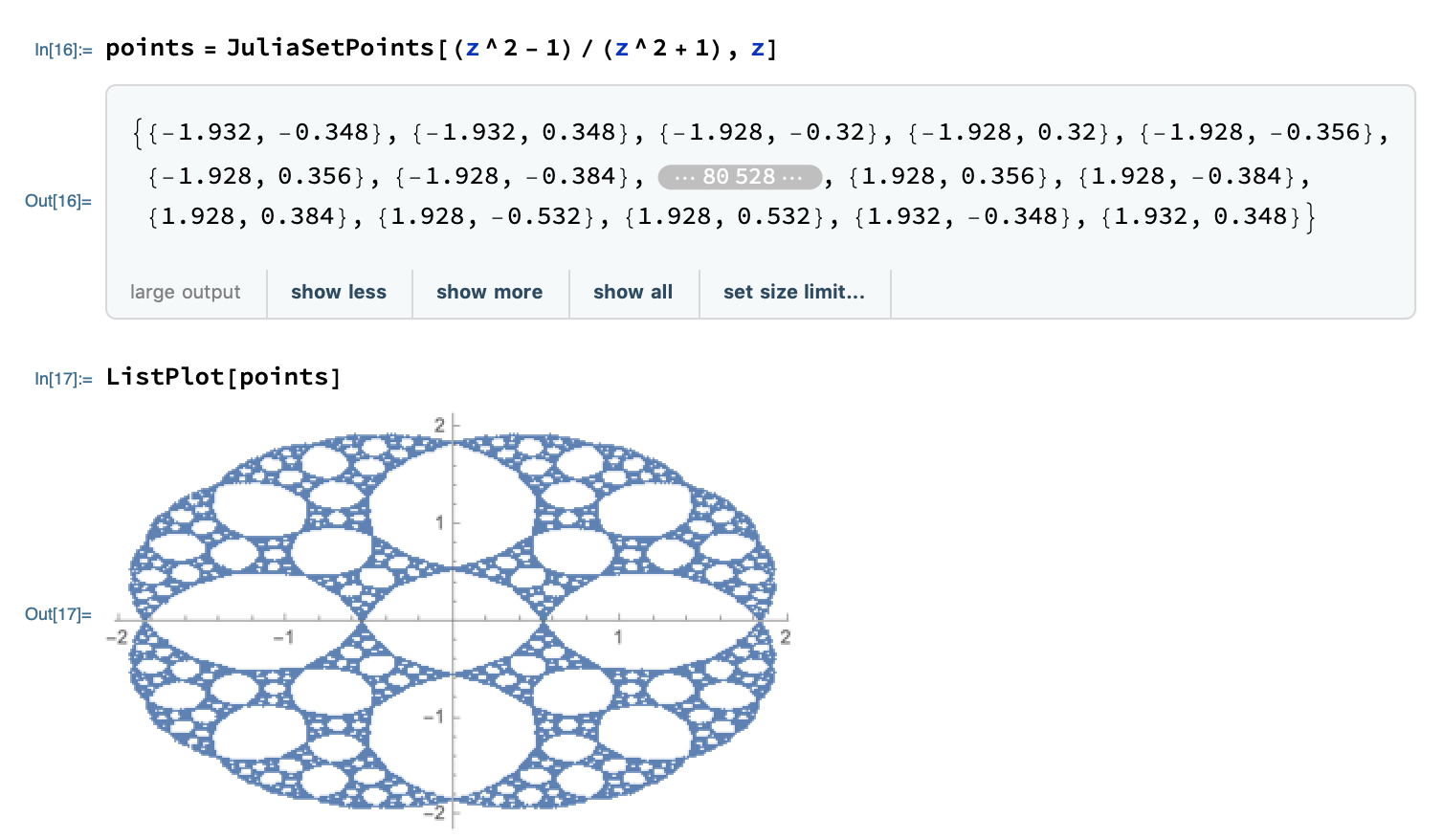
This is a Julia set. For this Julia set the function that I chose to use is (z^2 - 1)/(z^2 + 1). The reason why I picked this function is because when I was messing around online, I figured out that thus one reminded me of a cell. That is why I called this print the Julia cell. When typing the code, I could figure out how to make it 2d but I struggled to make it 3d. Eventually I graphed all of the points then made an image mesh. From there I did the region product of it in order to give it some height. This is what my code looked like:


When writing the code to print some struggles that I encountered the majority of my problems. The main problem that I encountered was trying to get my print time down. When I printed it vertically it was over 36  hours long. I did print it on a raft on the makers bot. This is what my final print looked like:


Return of the Hexaflake

Illia Stadnyk


Integrated function systems are systems that repeat on themselves. There are a lot of examples of them, but the simple idea is that they are fractals such as a snowflake. Most of them span over two-dimension but the particular that was done here, a hexaflake was done in third dimension. It was done here was done using a recursive function in openSCAD. It looks similar to a chamber of a revolver. Each of the hexagons will contain six copies, each smaller from itself.  This recursive function was done with a lot of if statements that all dictate where exactly it can be placed. Within those if statements it will call back to it self to perform, as is recursive works. The stopping point for it was the smallest size give. As the hexagons get one third smaller, the smallest size should be a power of 3, and initial size also a power of 3 for ease of use. Of course this is only example of one such hexaflake as the my previous example had while similar a different hexaflake and this is not the only way. In the example the original size was given 27, and the final size was given as 1 so would iterate it self 4 times. The only difficult parts are just to figure out where it needs to go.

An Inspiration of The Mandelbrot Set

Pantea Ferdosian
Dr. Sander
December 6, 2019
An Inspiration of The Mandelbrot Set

What does the Mandelbrot Set represent?
In the purest sense, the Mandelbrot set is simply a set of numbers that display certain unusual property, but since the set is always associated with an image that represents this property, we often use the term “Mandlebrot Set” to describe the image itself. The Mandlebrot set is a visual representation of an iterated function on the complex plane. 
The Mandelbrot set is a set of all numbers that DO NOT grow exponentially in the iterated function  and are typically represented by the color black. If we have a black circle, an image of the complex plane that shows all the possible numbers in the Mandelbrot set displayed in black, and iterate the function , each time in a different color, infinitely many times, we would end up with this shape:
For my specific print, as shown in the code, I manipulated my function for Manderlot set a bit to show how it would still be similar to the initial function. I raised my function to the power of 0.9.
But I also raised it to 2,3,4, and 5 and got very cool illustrative results: 


Strange chaotic attractor in small and large size

Strange chaotic attractors

Small and large strange chaotic attractor. 

Designed in Mathematica. Earlier in the semester, students were assigned to print attractors, and there are more details on the process in their blog and Thingiverse entries.  But I wanted one in a size fitting for a classroom lecture demo.

Printing done by Patrick Bishop on Ultimaker S5 with dissolvable filament.

Monday, December 2, 2019

McWorter's Pentigree Octagon

Math 401
Jean-Marc Daviau-Williams

For this print, I used the first iteration of the McWorter's Pentigree rotated by order 8 and stair-stepped two additional shapes above them, with one smaller than all combined.  The code to generate the object was done in OpenSCAD and was printed on the Ultimaker 3D printer.

The McWorter's Pentigree iterated function system is generated by "Starting from the origin, draw a line segment of length r at an angle of 36°. Turn left by 72° and draw another line segment of length r. Next turn right by 144° and draw a third line segment of length r. The remaining three line segments, each of length r, are formed by making a right turn of 72° followed by two left turns of 72°. The end of the last line segment will be at the point (1,0)" [1].  Initially, I planned out the code on paper and then translated it into OpenSCAD, doing basic trig to get the appropriate coordinates for each step.  While very aesthetically pleasing, this was very computationally intensive to generate, so I only did one iteration of this.


After rotating it order 8 and adding the stair-stepping for aesthetic effect, the render time was two minutes.  Processing addition iterations through recursion resulted in OpenSCAD crashing, due to limitations of my hardware and my limitations in coding in OpenSCAD.  In the future, once I become more accustomed to OpenSCAD and have a better computer, I could render additional iterations to make the default 6-iteration model.

As for the actual printing, the model was sliced and printed using Ultimaker Cura.  This printer was chosen because fine details were needed to be handled and when comparing the Ultimaker to the others in the Math Maker Lab, it is far superior.  As for the slicing, the object needed to be scaled up almost 1000% since I did not scale it properly in the code.  For the fill, 50% diagonal filling was done.  Finally, the estimated print time was 6 hours.

This print was difficult to code, not just because OpenSCAD is a less than desirable language to code in, but because of how it is not optimized well.  Combined with the natural computational intensity of the iterated functions systems and difficulty to program these shapes efficiently, the render time is unreasonably long.  However, I will learn from this and handle recursive functions better in future assignments.

1) http://larryriddle.agnesscott.org/ifs/pentigre/pentigre2.htm